Your AI Forgets You Every Conversation. Every Smart Team Just Quietly Built the Same Fix.
Why you keep re-explaining your business to ChatGPT, why every major AI company is solving it the same way, and the consumer-grade version that's already on your account.
You open a new Claude conversation. Or ChatGPT. Or whichever AI you’ve decided to use this month. You have a real task in mind. And the first five minutes are explaining what your business does. Who your customers are. How you talk to them. What “good” looks like. The same paragraph you typed yesterday, and the day before, because the AI does not remember.
This is one of the most frequent pieces of feedback I hear from people using AI for actual work. Not “the answers aren’t good.” Not “I don’t know what to ask.” It’s “I’m tired of re-explaining myself.”
That friction has a name now, sort of. The smartest teams in AI have all independently decided to fix it. And they’ve all independently arrived at the same shape of solution. This is worth keeping an eye on: when six unrelated companies converge on the same idea in the same six months, you’re probably looking at the future of how AI works.
The pattern, in plain English
The shift is this: stop making the AI rediscover your context every conversation. Save it once, in a useful form, and let the AI read it every time.
That sounds obvious in one sentence. The reason it’s a big deal is that for the last three years, the default way of using AI has been the opposite. Open a fresh chat. Type a prompt. Get an answer. Close the tab. Next time, start over.
The analogy that works: it’s the difference between explaining your job to a new contractor every Monday, versus handing them a one-page brief on day one and never having to repeat yourself. Same contractor, same skills. Wildly different output.
The convergence: a pattern showing up everywhere
What makes this worth a blog post isn’t any one product. It’s that the same idea is showing up everywhere at once, from teams that don’t talk to each other and have very different goals.
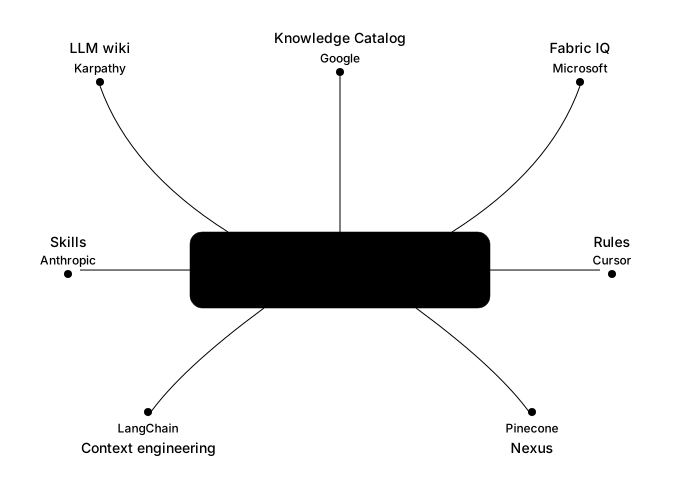
Seven independent teams, one architectural shape. Some of these are developer tools you’ll never touch directly (Cursor’s “Rules” for code editors, LangChain’s “context engineering” for AI app developers, Pinecone’s Nexus for enterprise data teams). The consumer-grade versions, the ones you can use today without writing code, are below.
Andrej Karpathy’s “LLM wiki.” Karpathy is one of the most respected AI researchers in the world. He’s spoken publicly about keeping his personal AI setup as a folder of plain markdown files that he keeps adding to, pointing his AI at the folder whenever he needs an answer. No infrastructure. No vendor. Just persistent notes the AI reads. The fact that the simplest possible version of this pattern works for one of the field’s sharpest minds tells you the pattern is fundamental, not vendor-specific.
Claude Projects (and Claude’s memory features). Anthropic’s consumer-grade version. Inside a Project, you drop in your background, your documents, your style examples, anything you’d otherwise type at the start of every conversation. Every chat inside that Project starts with all of it already loaded. You stop re-explaining yourself.
ChatGPT’s Custom GPTs. OpenAI’s version of the same idea. You build a “Custom GPT” by giving it a set of instructions and reference files, once, and then anyone who uses it starts with that context already in place.
Anthropic Skills. A newer, more structured version. Reusable bundles of context that handle a specific kind of task. Less for a single user’s general context, more for “here’s everything Claude needs to know to write our weekly client newsletter, save it, run it every week.” Same shape, different layer.
Google’s Knowledge Catalog and Microsoft’s Fabric IQ. The enterprise versions, aimed at companies. Both products take your existing documents, CRM records, and internal data and make them readable by the AI tools inside Google Workspace and Microsoft 365. So when you ask Copilot a question, it isn’t starting from scratch. It’s starting with your company’s actual knowledge as context.
Six teams. Six starting points. One shape: save your context once, in a structured way, so the AI doesn’t start from zero every time.
Why this matters for you
Here’s the part nobody is going to put in a press release, because it’s not exciting enough.
You don’t need to build any of this. The consumer-grade version is already on your account. If you pay for Claude, you have Projects. If you pay for ChatGPT, you have Custom GPTs. If you use Google Workspace or Microsoft 365 with the AI features turned on, you have the start of an enterprise version pointed at your existing documents.
The question isn’t whether you have access to this pattern. The question is whether you’re using it.
The practical move is small. Open a Claude Project (or a Custom GPT). Paste some useful general information into the project’s instructions. Add two or three of your best emails, your style preferences, your “what good looks like” notes. From now on, every chat you start inside that project skips the re-explaining step entirely.
What this doesn’t fix
Three honest caveats, because the pattern isn’t magic.
Garbage context in, garbage context out. If the context you save bakes in a wrong assumption (“our customers are mostly under 40,” when they’re actually mostly over 50), the AI will confidently work from that wrong assumption forever. The saved version of bad knowledge is worse than no knowledge, because it disappears into the background.
Context goes stale. Your business changes. Your customers change. Your saved context does not, unless you go back and update it. A Project you set up last March and haven’t touched is slowly drifting out of sync with the business you’re running today. Calendar a quarterly review, the same way you’d review any other reference document.
Your memory lives in their walls. Each platform stores your saved context differently and doesn’t make it portable. If you switch from Claude to ChatGPT, you don’t take your Projects with you. Keep the master copy of your context summary somewhere you own (a doc, a note, a markdown file) so you can rebuild it elsewhere if you need to.
What to do next
This week’s job is fifteen minutes long: open Claude Projects (or ChatGPT’s Custom GPTs), write some specific context into the instructions, and start your next real task inside that project instead of in a blank chat. Notice the difference. If you’re doing it right, you will not want to go back.
Continue to improve on the context you are injecting into your projects. Don’t just write it once, iterate and test the results.